What is the Library of limits?
To better support businesses managing diverse pricing strategies across different product segments, we’ve streamlined the configuration of pricing thresholds (like minimum margins). Previously, setting up custom limits for specific brands or categories meant creating dozens of individual repricing rules and any strategic shift required updating each one manually. This new feature lets you dynamically scale and vary your minimum prices across product segments within a single, unified framework, making strategic updates much faster.
The Library of limits acts as a centralized, universal database where you can define rules and thresholds for any part of your inventory. Once set up, you can apply this entire matrix to any repricing rule with a single click. The previous method of configuring limits directly within rules remains active. The new solution functions in parallel, increasing workflow efficiency for complex product structures.
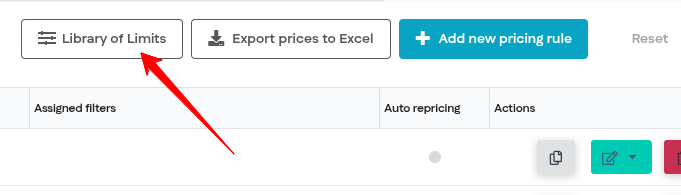
The library can be accessed from the rules list view:
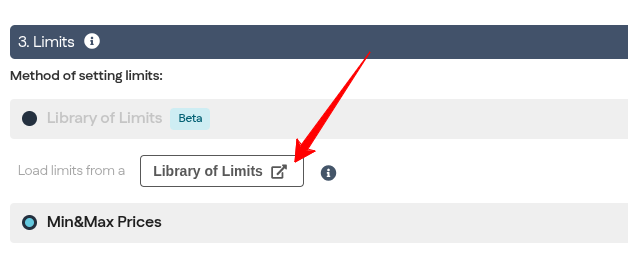
As well as from the rule parameter settings view:
How it works: architecture & system logic
The view of the new library is based on a flexible, four-column structure with advanced priority management:
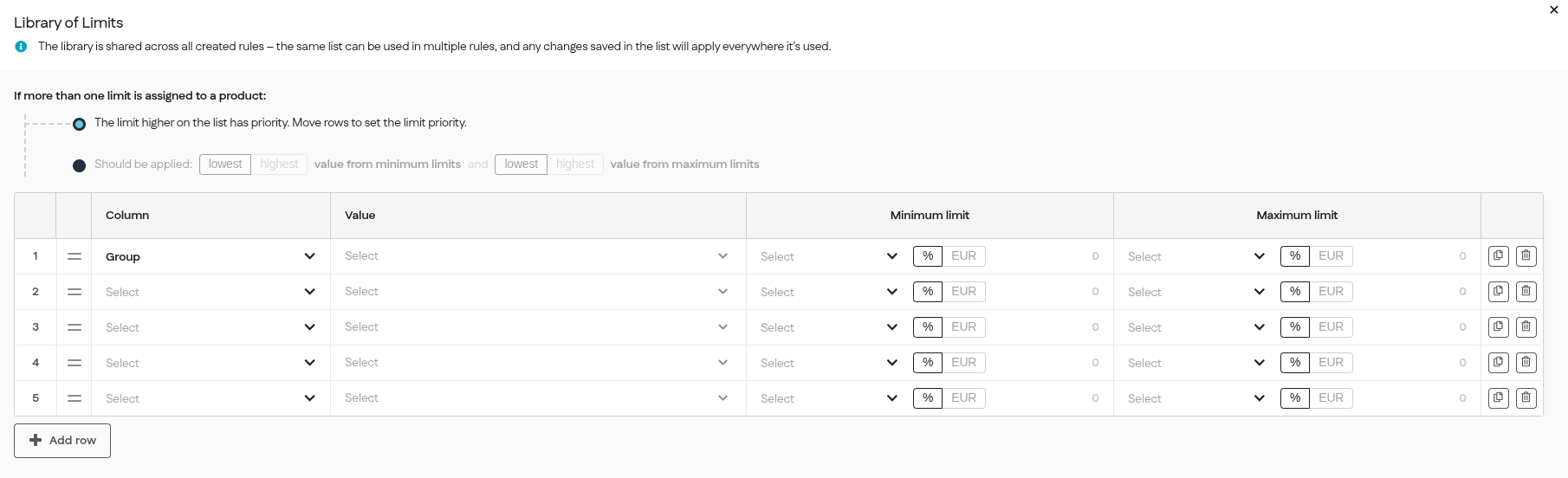
- Parameter (columns): defines the scope of the limit. Available options include: Group, Category, Brand, or All Products (global limit).
- Value: after selecting the parameter type, a multi-select dropdown appears with values mapped in the system (e.g., a list of all brands). This allows a single limit to be assigned to multiple items simultaneously.
- Minimum limit: allows you to select the base parameter from a dropdown menu, choose whether the limit should be expressed as a percentage or a fixed amount, and enter the specific value. The system suggests default values to ease configuration (e.g., 100% of the minimum price or a 20% margin).
- Maximum limit: functions similarly to the minimum limit configuration, allowing you to set the upper price or margin boundary.
How does the system handle overlapping limits?
To give you complete control when a product qualifies for multiple limits, you can choose between two resolution methods:
- Row Priority (List Order): By default, the system reads the table from top to bottom. Limits placed higher up on the list take precedence (and you can drag and drop rows to reorder them).
- Value-Based Selection (Highest vs. Lowest): You can choose a global rule for how overlapping limits interact:
- Highest Value: prioritizes margin protection and financial security.
- Lowest Value: lets the system push for more aggressive price matching.
To see exactly which limit triggered a product's final price, just head over to the explanation of how the price was calculated (the button next to the price simulation).
How to roll out the Library of limits to your current rules?
- Audit your current setup: Look at your existing repricing rules and take note of the price and margin limits you currently use for different brands or categories.
- Build your library: Transfer these values directly into the newly created Library of limits, assigning the appropriate thresholds to the correct assortment segments.
- Link the library: Create a new repricing rule with your chosen strategy, and instead of typing out limits manually, simply load your prepared library.
- Switch over: If you want to make sure that all limits from your previous rules have been accurately mapped, compare the calculated prices before full deployment, they should be identical to the previous ones. Once you confirm the prices match, activate the new rule; you can simply delete the old configurations.
And that’s it! You can now manage your entire pricing strategy from one central place, without the need to maintain separate rules :)
Was this article helpful?
That’s Great!
Thank you for your feedback
Sorry! We couldn't be helpful
Thank you for your feedback
Feedback sent
We appreciate your effort and will try to fix the article